zpunk pocket groovebox
mobile-first · sequencing · samples · synth · arrangement

Build full ideas on a single screen at a time.

zpunk is a focused groovebox for making drums, chopped samples, synth parts, chord progressions, and full pattern chains without losing the sketch. Every tab is built around one clear task, so you can move from beat to arrangement fast on a phone.

Built around fast idea generation, better save recall, cleaner synth control, and a more playable touch workflow.
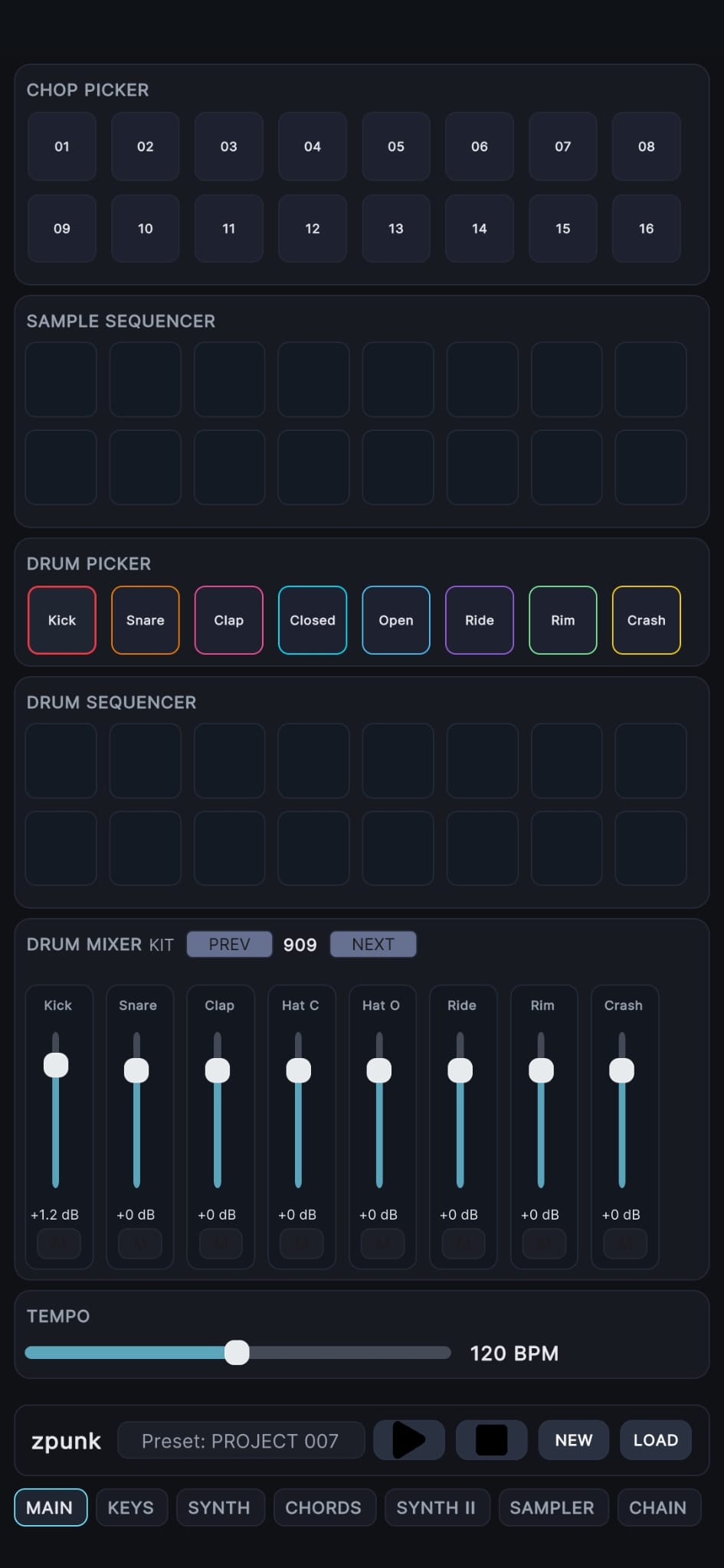
zpunk main tab screenshot
Latest direction

Recent work is all about speed, recall, and flow.

The newest zpunk updates push the app toward faster beat generation, more expressive drums, tighter sample shaping, and more reliable loading so ideas survive from sketch to saved project.

Random Beat Generator

Get unstuck instantly

Long-press STOP on the main page to generate a new beat. zpunk alternates between different groove styles like House and Boom Bap, giving you a fast starting point you can immediately edit.

Drum Velocity

More human drums

Tap a placed drum step again to cycle its velocity between low, mid, and high. Use this for ghost snares, softer hats, stronger kicks, and more natural accents.

Sampler Pitch

Reshape a chop in place

Select a chop, then use the pitch control to push it up or down without leaving the sampler. One source sample can become bass notes, leads, textures, or melodic variations.

Safer Loading

Projects restore cleanly

Project loading now stops playback before data is restored, helping patterns, chains, synth settings, and sampler state come back in the correct order.

Main Tab

The performance view.

The main tab is the fastest way to begin a track. Drums, sample triggers, chop selection, mixer balance, transport, and tempo stay visible so you can build the core groove without switching screens.
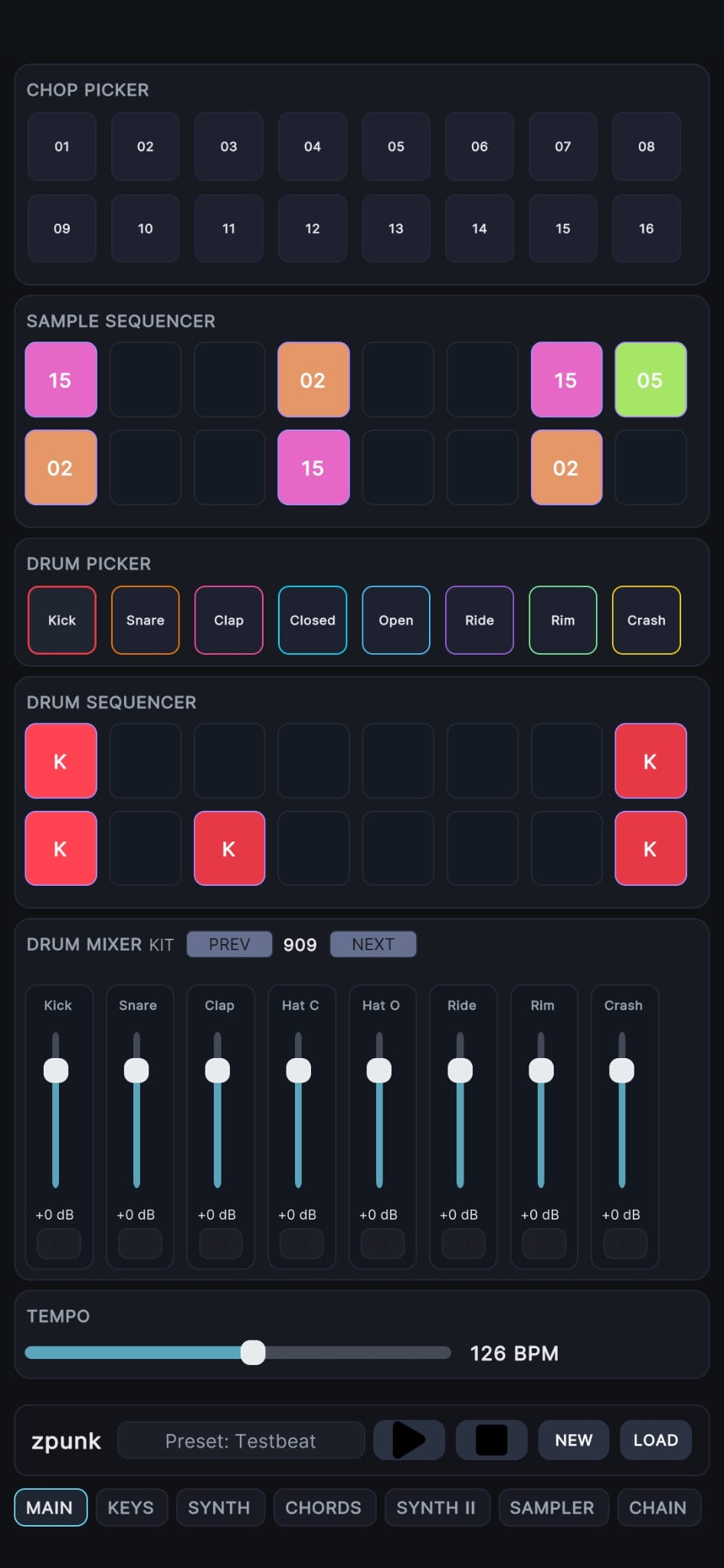
zpunk main screen

Drums, chops, mixer, and tempo — all in one place.

Think of the main tab as the groove sketchpad. Tap in drums, trigger sample chops, adjust levels, and evolve the loop while it plays in real time.

Drum Sequencer Select a sound from the Drum Picker — Kick, Snare, Clap, Hats, and more — then tap steps in the sequencer to place hits into the pattern.
Velocity Control Hold a step and drag vertically to change its velocity. Each hit supports three levels: low, mid, and high. The visible label, like K for Kick, represents the mid velocity.
Sample Sequencer Choose a slice from the Chop Picker, then place it into the sample lane to trigger chops rhythmically alongside the drums.
Random Beat Generator Long-press Stop to instantly generate a new groove. zpunk rotates between styles such as house and boom-bap to create quick starting patterns.
Transport & Tempo Press Play to audition the loop while editing. The BPM control can be adjusted during playback to explore different timing and groove.
Fast Workflow Drums, samples, mixer levels, and tempo stay visible on a single screen, so ideas can be sketched quickly before moving to synth, chords, or arrangement.

Keys tab for melodic sequencing.

The keys page is where single-note melodies, riffs, and bass patterns get sketched. It pairs a note grid with fast patch browsing so the sound and the notes can evolve together.
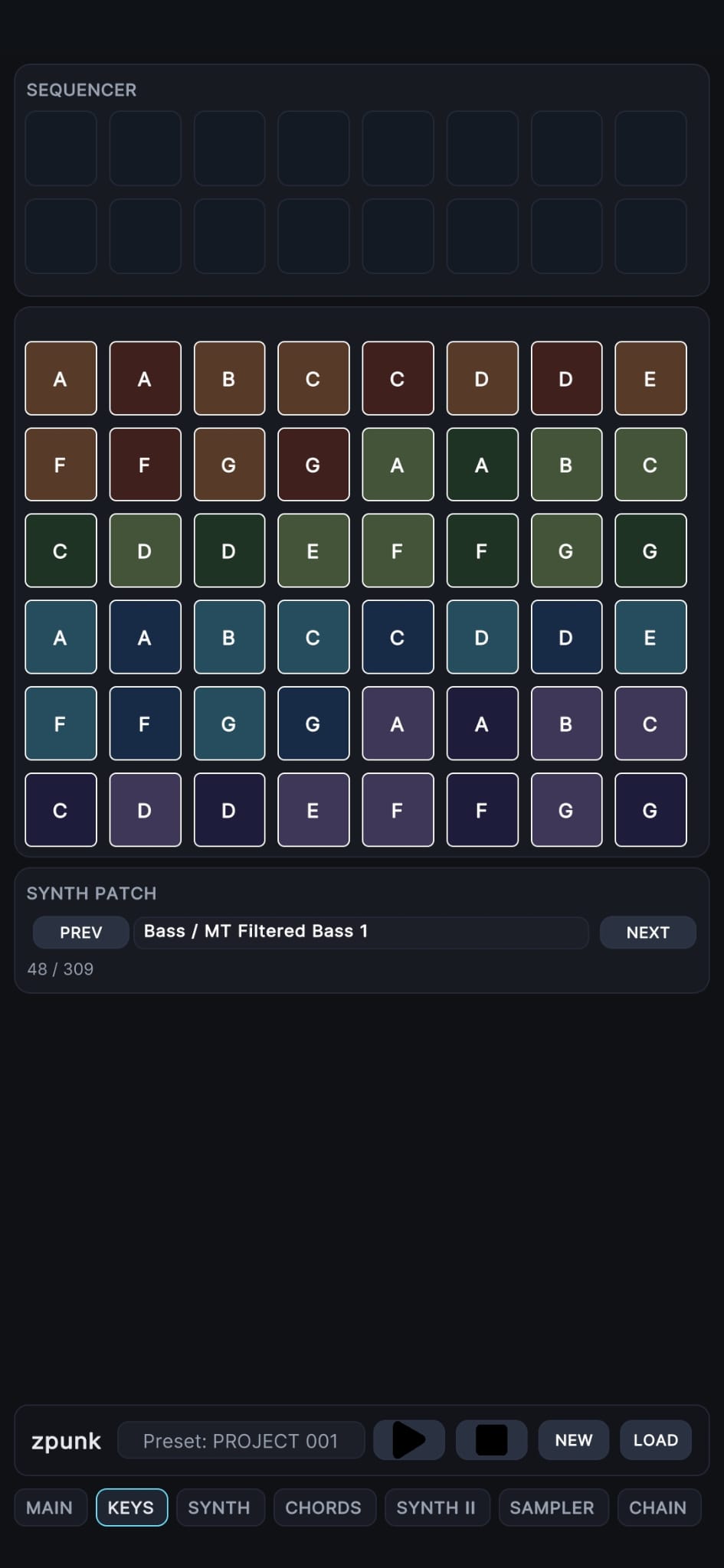
Touch-first note grid Tap steps to place notes quickly, then drag where needed for held notes without cluttering the interface.
Patch browsing Use the patch controls to move through synth sounds while keeping the current sequence intact.
Accurate note lengths Adjacent sixteenths stay separate when entered individually, while dragged notes preserve longer held lengths.
Project recall Saved patterns restore more reliably, so melodic ideas come back the way they were written.
zpunk keys tab screenshot
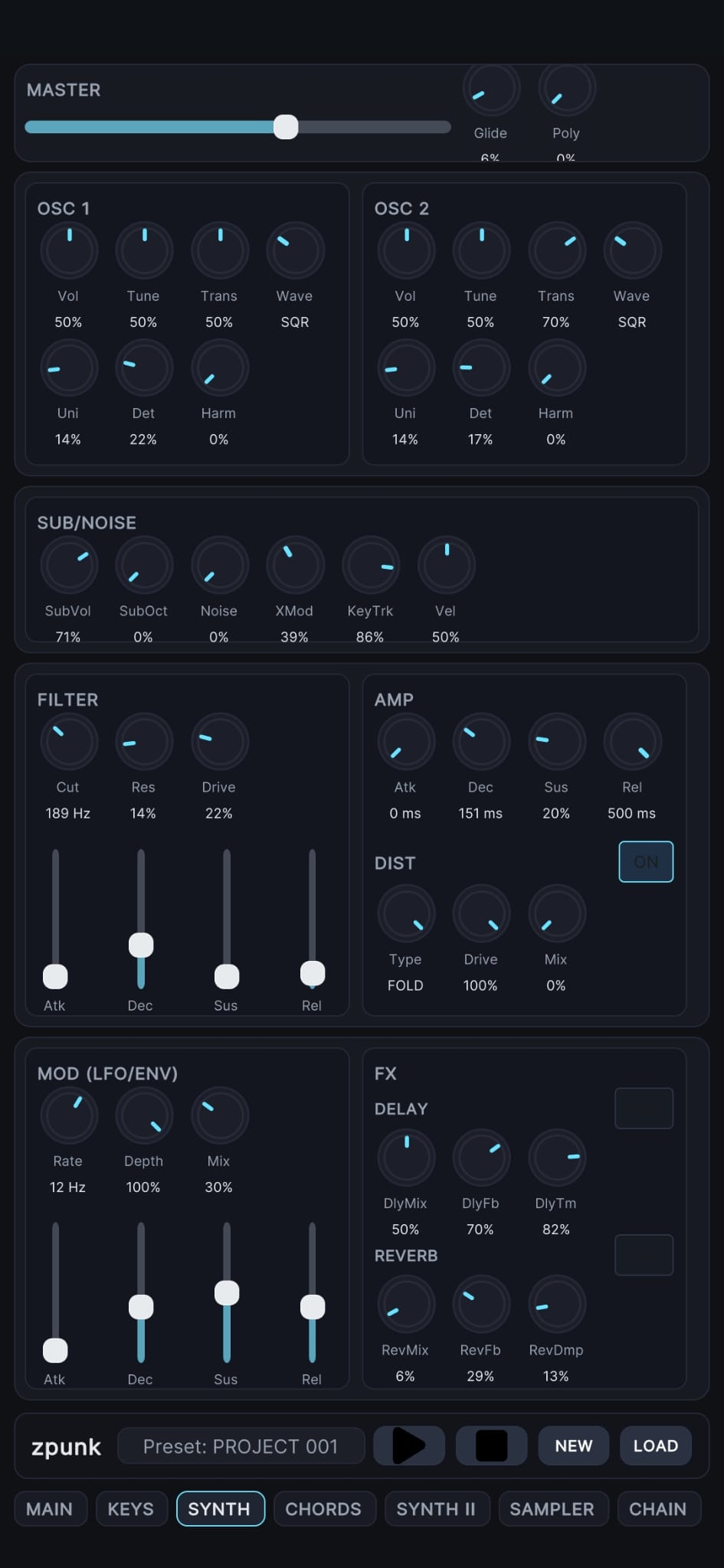
zpunk synth panel screenshot

A cleaner synth panel with more hardware feel.

The synth page is about direct sound design. Recent work tightened the layout, removed redundant controls, and made patch shaping feel more deliberate on mobile.

OSC control Adjust volume, tune, wave, unison, detune, and harmonic shape directly from the panel.
ADSR by knobs + sliders Shape amp and modulation behavior more clearly, with a compact layout that stays readable on a phone.
Distortion module Use type, drive, and mix to add edge, weight, or saturation when a patch needs more bite.
Stable loaded state When projects load, visible synth values better reflect the current saved sound instead of snapping after interaction.

Chords tab for fast harmonic progressions.

Instead of entering one note at a time, the chords page lets each step trigger a full harmony. It is designed to keep progression writing fast, visual, and playable.
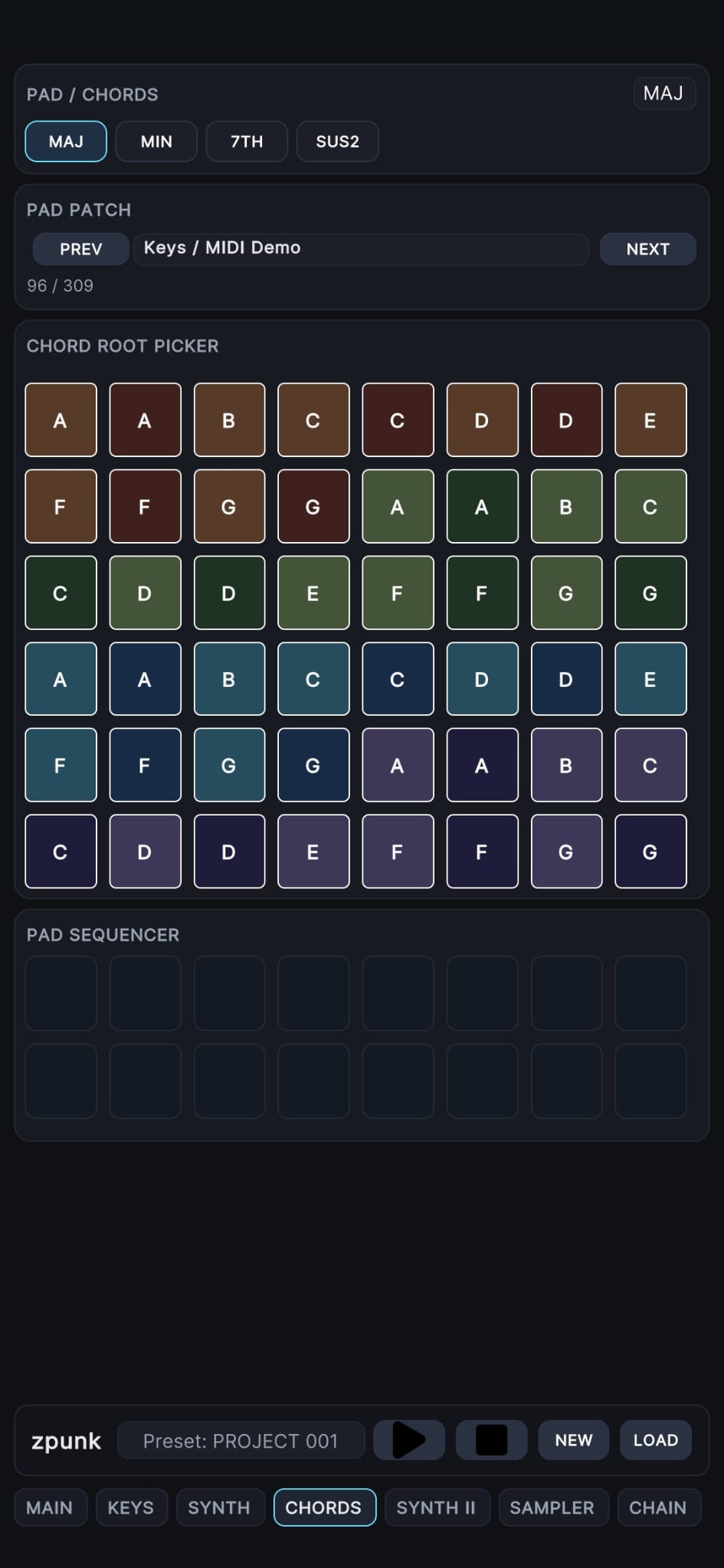
Chord modes Choose between Major, Minor, 7th, and Sus2 to change the feel of the progression instantly.
Root picker Select a root from the pad grid, then place that harmony into the chord sequencer.
Step sequencing Tap the sequencer cells to build a progression that runs in sync with drums, keys, and samples.
Thumb-friendly layout Built for quick input on mobile without the density of a desktop piano-roll editor.
Chord and Key Generator Built for quick input on mobile without the density of a desktop piano-roll editor. Long press the CHORDS or KEYS tabs to instantly generate chord progressions and melodies.
zpunk chords tab screenshot
zpunk sampler screenshot

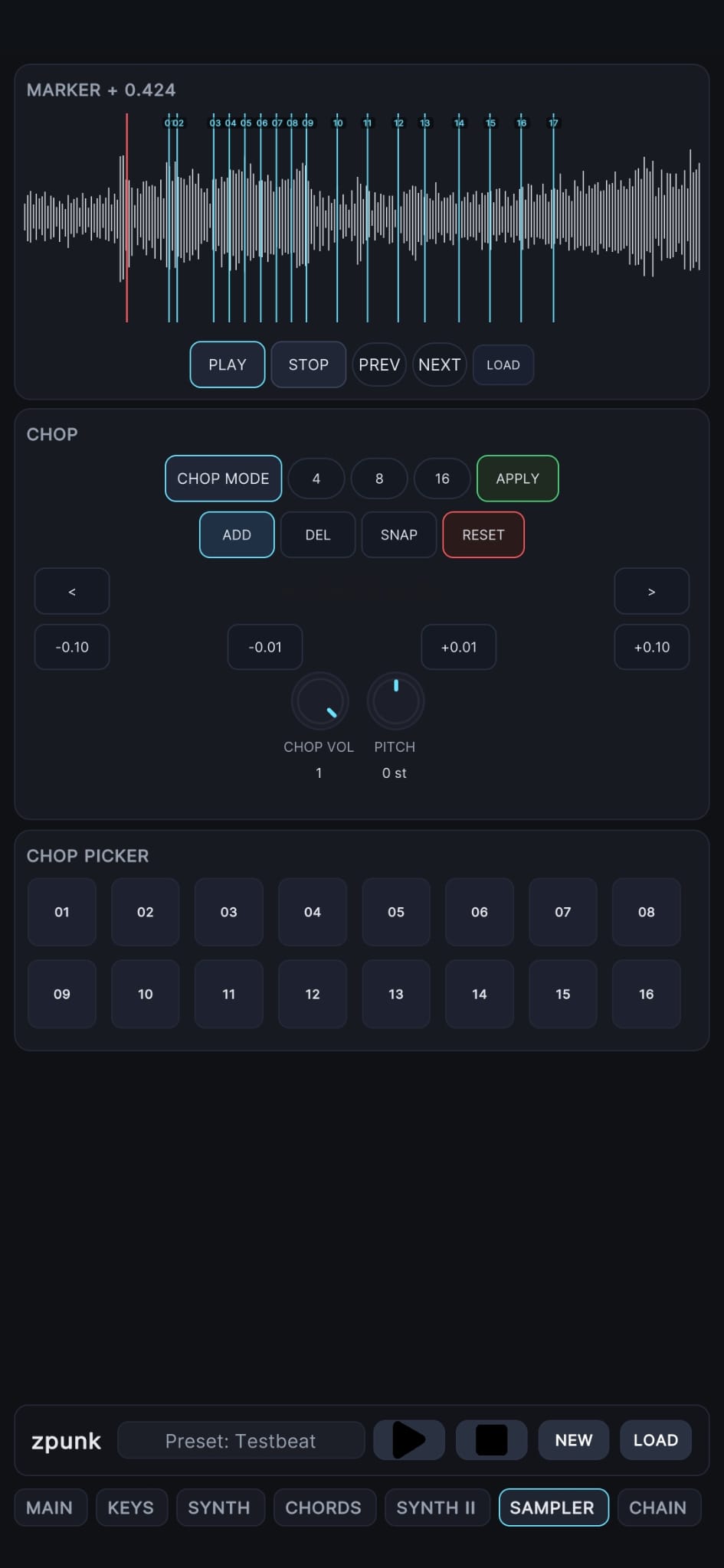
Sampler tab for chop shaping and fast sample performance.

The sampler turns one audio source into a playable bank of slices. You can quickly divide a sample, zoom into the waveform, adjust chop boundaries, and sequence the pieces directly into your beat.

Load + Chop Press Load to import a sample, then enable Chop Mode to divide the audio into 4, 8, or 16 slices. This creates a bank of playable chops.
Touch waveform controls Use two-finger drag to move across the waveform and pinch to zoom for detailed editing when working with tight chops.
Precise chop editing Use the -0.10 / -0.01 / +0.01 / +0.10 controls on screen to trim or extend the selected chop boundary in small time increments. This makes it easy to tighten drum hits or extend musical tails.
Apply + Chop Picker Press Apply to lock the slice layout, then select individual chops from the Chop Picker grid and place them into the sample sequencer.
Pitch per chop Each chop can be pitched independently, letting one sample become bass notes, melodies, textures, or rhythmic variations.
Live preview Tap chops to audition them instantly so you can quickly test slices before placing them into the sequence.
Sample Loading

Bringing your own samples into zpunk.

zpunk supports a simple bring-your-own-samples workflow on both Android and iOS. Once your files are placed in the expected location, they can be loaded directly from the sampler.

Loading samples on Android and iOS.

zpunk works best with short one-shots, loops, vocal fragments, and textures that can be chopped and sequenced. Place your audio files where the app can see them, then load them from the sampler.

Android Place your audio files inside the device’s Music folder. zpunk reads from the Android music library, so any samples stored there become available inside the sampler.
Android workflow Copy samples to the Music folder on your device. In zpunk, open the sampler and press Load to browse and import them into the current session.
iOS folder method Create a folder called ImportedSamples (case sensitive). Place your audio files in that folder, then replace the existing ImportedSamples folder inside the zpunk directory in the Files app.
iOS Import button You can also press the Import button inside the sampler to open the iOS file picker. From there you can choose audio files directly from the Files app or other locations on your device.
After loading Once a sample is loaded, enter Chop Mode, divide the audio into slices, and use the Chop Picker to sequence them alongside your drums.

Chain tab for arrangement and live pattern editing.

Chain view turns short loops into structure. It is built for placing patterns across bars, duplicating ideas forward, and continuing to edit while the arrangement plays.
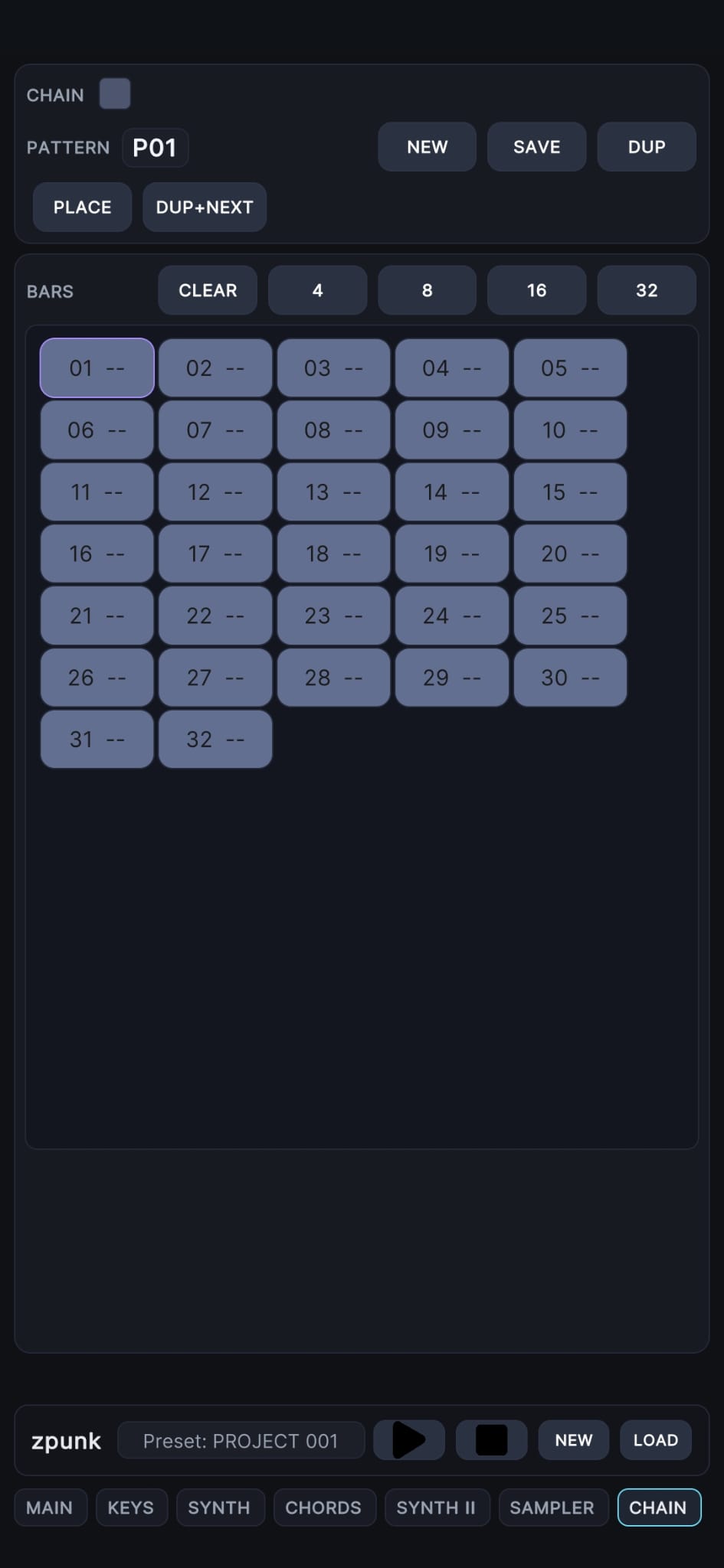
Pattern workflow Use New, Save, and Dup to create or duplicate patterns, then Place them onto bars in the chain.
Dup + Next Quickly carry an idea forward into a new pattern slot so variations are easy to build section by section.
Live edits stick When the chain is running, edits now write into the active pattern more reliably instead of getting lost.
Arrangement flow Choose chain length, place patterns across bars, and expand a loop into a fuller structure without stopping the sketch.
zpunk chain tab screenshot